
Import a Trial Balance in an Interim Engagement
-
Navigate to the "import trial balance" screen from the "all engagements screen" by selecting your interim reporting engagement from the "all engagements screen".
-
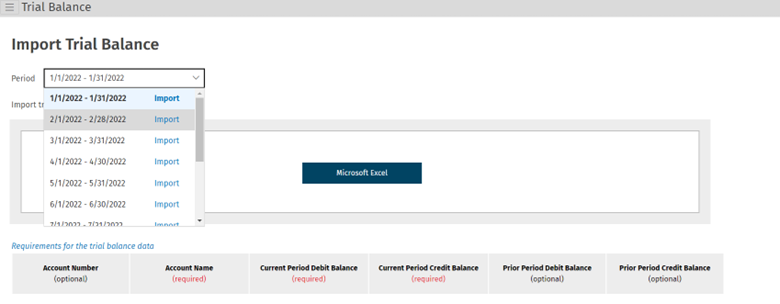
Using the drop down menu (pictured below), select the period whose trial balance you’d like to import. For your monthly interim engagement select from one of the 12 periods one for each of the calendar month, and for quarterly select from one of the four (4) periods one for each quarter. This is the "active period", and this selection will be maintained as you navigate throughout the interim engagement unless you change it.
-
Click the "Microsoft® Excel®" import button to import your trial balance.
-
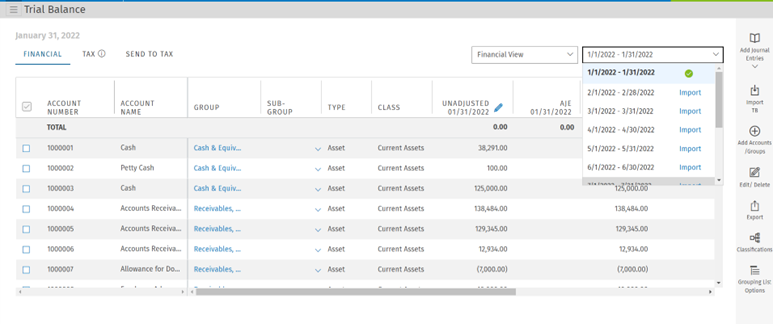
Upon successful import, you will be navigated to the trial balance screen for the period that has been just imported. Any periods which have been imported into your engagement will be denoted with a green checkmark in the period drop down menu (pictured below).
-
To import further periods, use the period drop down on the "trial balance" page to navigate to the period which you’d like to import (pictured below).
-
In an interim engagement (monthly or quarterly), a single chart of accounts is used. Any accounts imported in one period and assigned characteristics, such as classifications, groups, and subgroups, will retain these characteristics across all periods. However, account balances are unique to each period.